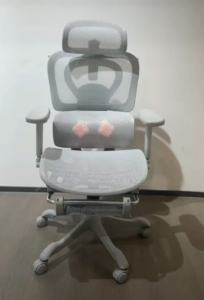
Working from home or in the office for 8+ hours a day? An ergonomic office chair isn’t just a luxury—it’s a must-have for your comfort, productivity, and long-term health. The right chair can reduce back pain, improve posture, and even boost your focus. But with so many options on the market, how do you pick the right one? In this guide, we break down everything you need to know to choose an ergonomic office chair built for long work hours.
Why Ergonomic Office Chairs Matter for Long Work Hours
Sitting for extended periods puts significant stress on your spine, neck, and hips. A non-ergonomic chair often leads to slouching, lower back pain, and even chronic posture issues over time. Ergonomic chairs are designed to support your body’s natural alignment, distributing weight evenly and reducing pressure points. Whether you’re working from home or managing a team in an office, investing in a quality ergonomic chair is an investment in your well-being and work performance.
Key Features to Look for in an Ergonomic Office Chair
Not all ergonomic chairs are created equal. When shopping for a chair for long work hours, focus on these non-negotiable features:
1. Adjustable Lumbar Support
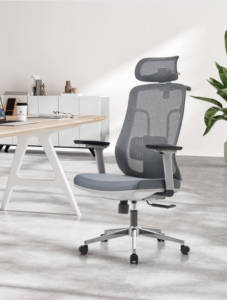
The lumbar (lower back) is one of the most strained areas when sitting. Look for a chair with adjustable lumbar support that can be raised, lowered, or tilted to fit your natural curve. This feature prevents slouching and keeps your spine aligned throughout the day.
2. Seat Height and Depth Adjustment
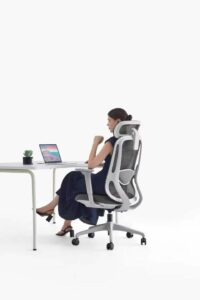
Your feet should rest flat on the floor with your knees at a 90-degree angle. A chair with adjustable seat height ensures this fit for your body. Seat depth is equally important: the front edge of the seat should leave a 2–3 finger gap between the edge and the back of your knees, preventing pressure on your thighs.
3. Breathable, Durable Materials
For long work hours, comfort and durability go hand in hand. Look for chairs with:
- Mesh backs: Breathable and supportive, ideal for those who get warm easily.
- High-density foam cushions: Retain shape over time and offer consistent support.
- Waterproof or stain-resistant fabrics: Easy to clean, perfect for busy offices or home setups.
4. Adjustable Armrests
Armrests that can move up, down, and side-to-side let you position your elbows at a 90-degree angle, reducing strain on your shoulders and wrists. This is especially important if you use a keyboard or mouse for extended periods.
5. Recline and Tilt Functions
A chair with a tilt mechanism lets you lean back slightly to take pressure off your spine during breaks. Some models even offer lockable recline positions, so you can find the perfect angle for both work and rest.
Common Mistakes to Avoid When Buying an Office Chair
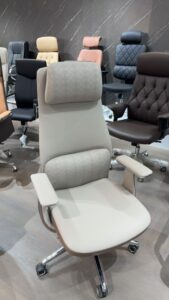
- Choosing style over support: A chair that looks good but lacks adjustability will lead to discomfort quickly.
- Ignoring weight capacity: Make sure the chair’s weight limit exceeds your needs for safety and durability.
- Skipping the “test sit”: If buying online, check customer reviews for comfort feedback, or choose a brand with a trial period.
Final Tips for Maximizing Comfort
Even the best ergonomic chair works best with good habits:
- Stand and stretch every 60–90 minutes to keep blood flowing.
- Pair your chair with a desk at the correct height (elbows at 90 degrees when typing).
- Adjust your monitor to eye level to avoid neck strain.
At SYC, we design ergonomic office chairs built for long work hours, with adjustable lumbar support, breathable mesh, and durable materials to keep you comfortable from 9 to 5 and beyond. Explore our collection to find the perfect fit for your home or office.