Sitting is the defining posture of modern knowledge work — and the chair underneath you shapes everything from your spinal health to your afternoon focus. Yet most people spend more time choosing a laptop than the seat they use eight or more hours a day.
The global office chair market was valued at approximately $18.25 billion in 2025 and is projected to reach $24.85 billion by 2032, driven by the rise of hybrid work, growing corporate wellness programs, and an increasingly health-conscious workforce. With hundreds of models across a dozen distinct chair types, navigating your options without a roadmap is nearly impossible.
This guide covers every major type of office chair, explains the science behind ergonomic design, and gives you a clear, evidence-based framework for choosing the right chair — whether you’re outfitting a corner office, a co-working floor, or a home studio.
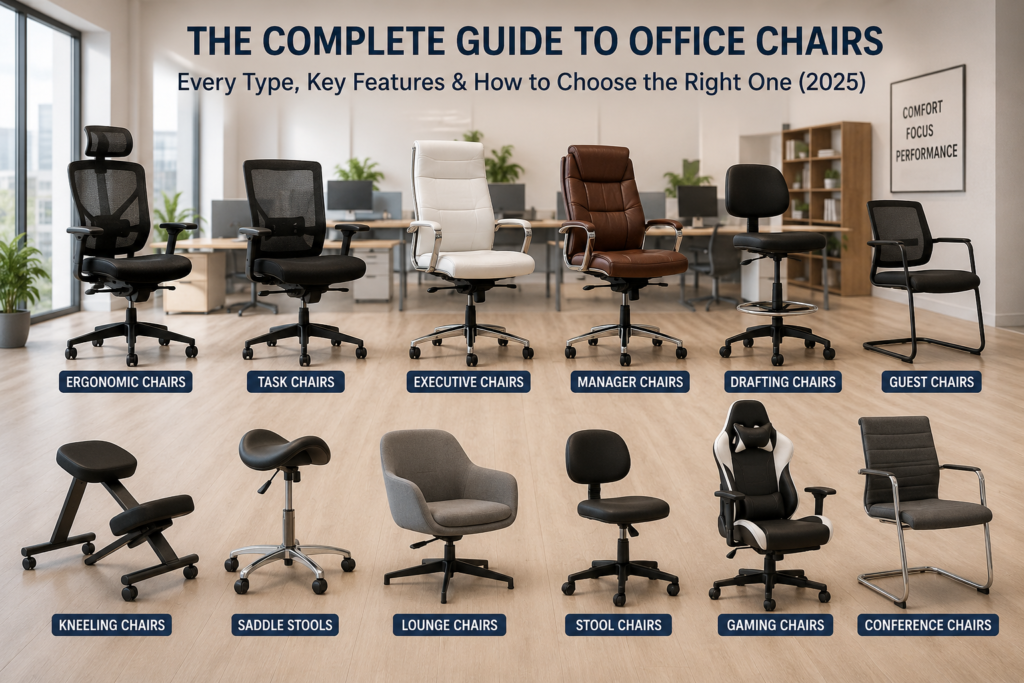
Table of Contents
- Why Your Office Chair Matters More Than You Think
- Task Chairs
- Executive Chairs
- Ergonomic Chairs
- Mesh Chairs
- Leather & Upholstered Chairs
- Specialized Seating: Kneeling, Saddle & Balance Ball Chairs
- Drafting Chairs & Stools
- Conference & Guest Chairs
- Big & Tall Chairs
- 24-Hour / Heavy-Duty Chairs
- Key Features to Look For in Any Office Chair
- How to Choose the Right Office Chair: A Step-by-Step Framework
- Office Chair Comparison Table
- Frequently Asked Questions
1. Why Your Office Chair Matters More Than You Think
Office workers spend approximately two-thirds of their daily work time seated, according to a 2025 scoping review in the Journal of Back and Musculoskeletal Rehabilitation. This prolonged static loading on the spine is directly associated with musculoskeletal discomfort, reduced circulation, and diminished cognitive performance.
The biomechanical case for quality seating is clear. Research published in Ergonomics (De Carvalho et al., 2023) — a peer-reviewed study of 31 adults — found that chairs featuring lumbar support combined with seat pan tilt adjustability produced significantly more neutral spine and pelvic postures compared to unsupported standard seating. Critically, 39% of participants in that study were classified as “pain developers” during a standard sitting task, underscoring how poor chair design affects a large proportion of users even within short timeframes.
A separate analysis in Nature Scientific Reports (2025) identified a statistically significant association between inappropriate chair height and pain in the knee, shoulder, and upper back regions — reinforcing that fit and adjustability are not optional extras, but health-critical specifications.
Beyond the individual, the organizational stakes are high. The International Association for the Study of Pain (IASP) notes in its 2025 Workplace Fact Sheet that back pain is one of the leading causes of occupational absenteeism globally. Investing in the right chair is, in measurable terms, an investment in productivity.
2. Task Chairs
Best for: Daily desk work, multi-user environments, home offices, open-plan offices
Task chairs are the most common office chair in the world — and for good reason. Engineered specifically for the demands of daily professional use, they strike a practical balance between ergonomic function, durability, and cost-effectiveness.
What defines a task chair?
A standard task chair features:
- A mid-height backrest (reaching the mid-back or shoulder blades)
- Seat height adjustment via pneumatic gas lift
- 360-degree swivel base with five-point caster wheels
- At least basic armrest adjustment
- Tilt/recline mechanism with lockable positions
Many modern task chairs now include adjustable lumbar support, seat depth, and 3D or 4D armrests — features previously reserved for premium ergonomic models.
Who should buy a task chair?
Task chairs suit most knowledge workers who spend 4–8 hours per day at a desk. They work equally well in corporate offices, home offices, and multi-shift environments where different users may occupy the same seat.
3. Executive Chairs
Best for: Private offices, leadership roles, spaces where professional presentation matters
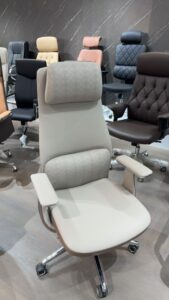
Executive chairs serve a dual function: they provide ergonomic support for long work sessions while projecting the authority and professionalism expected in leadership environments. These chairs typically feature higher backrests, premium materials, and more substantial proportions than standard task chairs.
Key characteristics
- High backrest extending to the upper back and sometimes the headrest
- Premium upholstery: genuine leather, bonded leather, or high-grade PU
- Heavier, wider construction for a commanding presence
- Padded armrests, often fixed or with limited adjustment
- Thicker cushioning with a focus on comfort over extended sit periods
Functional advantages
The elevated backrest of an executive chair provides real support for the upper thoracic spine and neck — particularly valuable during long meetings or phone calls. Premium materials like leather age gracefully and resist wear in high-use environments.
Considerations
Executive chairs are not always the most adjustable option. Many prioritize aesthetics over fine-tuned ergonomic customization. If you need precision postural support as much as professional appearance, look for executive models that also include adjustable lumbar depth, seat height, and armrests.

4. Ergonomic Chairs
Best for: Users with back pain, long work hours (6–10+ hours/day), health-conscious professionals
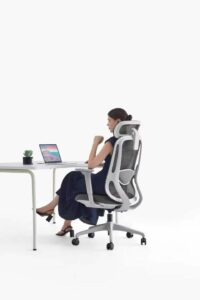
Ergonomic chairs represent the science-driven segment of the market. Unlike standard chairs designed around an average body, ergonomic chairs are built to adapt to the user — an approach summarized by the ergonomic principle of fitting the workspace to the person, not the other way around.
What separates an ergonomic chair from a regular office chair?
A chair marketed as “ergonomic” should, at minimum, offer:
- Adjustable lumbar support (height and depth)
- Seat depth adjustment to accommodate different leg lengths
- 4D armrests (adjustable in height, width, depth, and angle)
- Seat tilt and tilt tension control
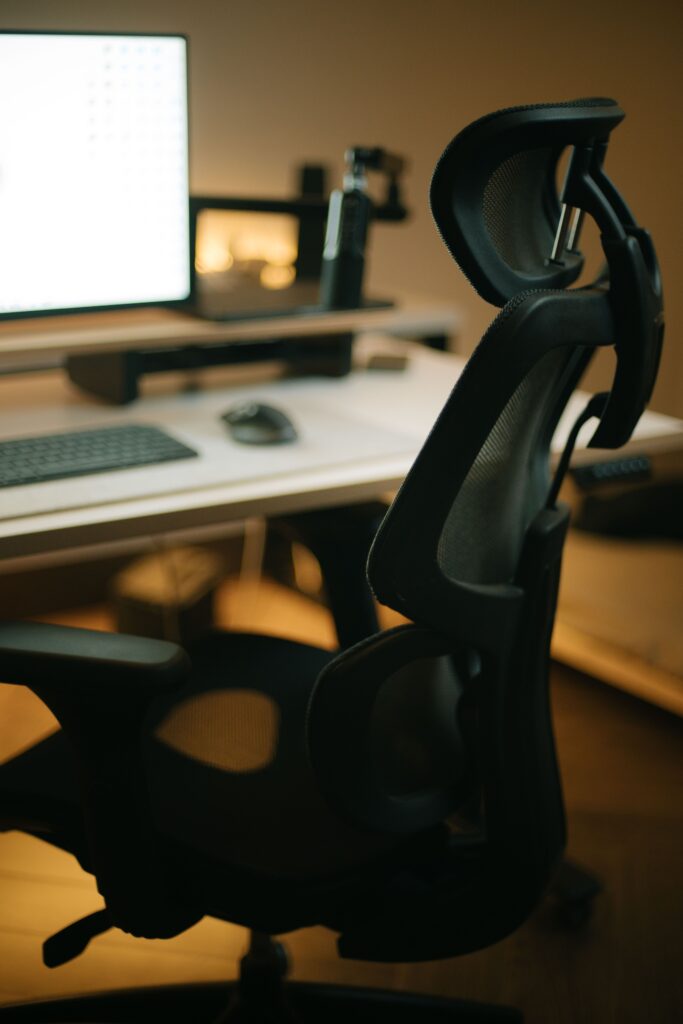
- Adjustable headrest (in higher-end models)
Premium ergonomic chairs go further. Herman Miller’s Aeron — widely considered the benchmark since its 1994 introduction and still a top-reviewed chair in 2025 — uses an 8Z Pellicle suspension mesh that provides differential support across sitting zones. Steelcase’s Leap features LiveBack technology that adjusts the chair’s shape to mirror the natural movement of the spine. Haworth’s Fern, launched as one of the most advanced ergonomic chairs of 2025, incorporates a patented Wave Suspension system that flexes in harmony with micro-shifts in posture.
Price range and investment logic
Ergonomic chairs range from roughly $300 for solid mid-range options to over $2,000 for flagship models. For users seated 6+ hours daily, the cost per day over a typical 10-year chair lifespan often amounts to pennies — while the potential health benefits are significant. Many employers, particularly in tech and professional services, now subsidize ergonomic chair purchases as part of employee wellness programs.
5. Mesh Chairs
Best for: Warm climates, users who run hot, all-day seated work
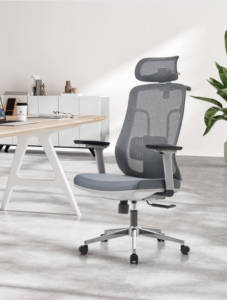
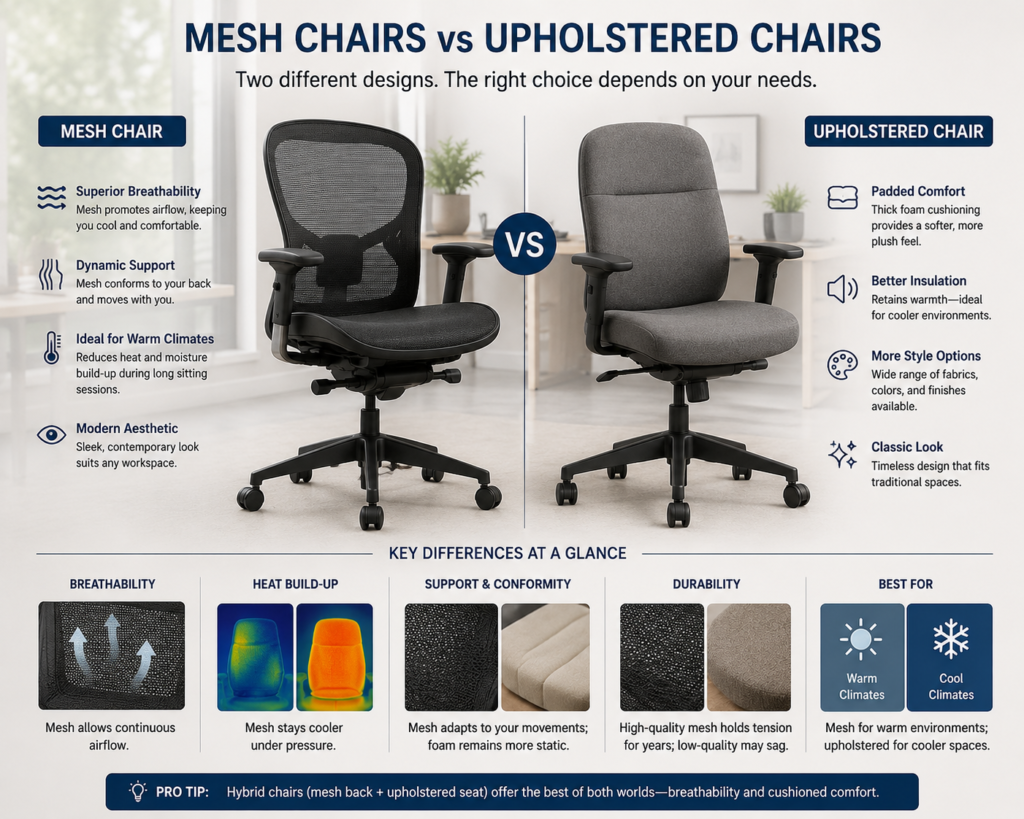
Mesh chairs have become the dominant design in modern office environments, prized for their breathability, contemporary aesthetic, and structural responsiveness to body movement.
How mesh differs from foam-padded seating
Traditional upholstered chairs use foam that compresses under body weight, reducing airflow and building heat over time. Mesh backrests — and in many designs, mesh seats — allow continuous airflow, keeping surface temperature cooler and reducing perspiration during long sitting sessions.
Beyond breathability, high-quality mesh conforms dynamically to the user’s back shape, offering a degree of adaptive support that rigid foam cannot replicate. Premium mesh materials like Herman Miller’s Pellicle or Humanscale’s tri-panel tension mesh are engineered to distribute pressure across the back without concentrating stress at any single point.
Limitations to know
Not all mesh is created equal. Budget mesh chairs often use loose, unsupported weaves that sag with use, losing their supportive tension within months. When evaluating a mesh chair, check the mesh density, frame construction, and warranty — quality mesh should hold its tension for years.
In very cold environments, mesh chairs offer less insulation than padded alternatives. Users who prefer a softer, cushioned feel against the body may find padded or hybrid chairs (mesh back, foam seat) more comfortable.
6. Leather and Upholstered Chairs
Best for: Executive offices, formal meeting rooms, aesthetics-conscious environments
Leather chairs remain the material of choice for executive and high-end office environments, valued for their durability, ease of cleaning, and timeless professional appearance.
Material types explained
Full-grain leather is the highest quality, retaining the natural grain of the hide. It is the most durable and develops a desirable patina with age. It is also the most expensive.
Top-grain leather has been sanded or corrected for a uniform appearance. It is more consistent-looking than full-grain and still very durable.
Bonded leather / PU leather is a composite or synthetic material. It mimics the look of genuine leather at a fraction of the cost, but is substantially less durable — it may peel or crack within 2–5 years with regular use.
Fabric / upholstered chairs use woven textiles over foam padding. They are often softer and more breathable than leather, available in a wide range of colors and textures, and typically more affordable. They require more maintenance to keep clean.
Key buying consideration
For environments where chairs receive daily, multi-year use, the initial cost savings of bonded leather or low-density foam padding will often be offset by earlier replacement. Full-grain or top-grain leather with high-resilience foam is the more economical long-term choice in high-use scenarios.
7. Specialized Seating: Kneeling Chairs, Saddle Chairs & Balance Ball Chairs
These alternatives challenge the conventional seated posture and are gaining traction as part of active, varied sitting strategies.

Kneeling Chairs
Kneeling chairs position the user’s legs at approximately 70 degrees rather than the conventional 90-degree angle of standard seating. This forward-tilted configuration shifts the pelvis anteriorly, naturally encouraging a more upright lumbar curve and reducing the compressive load on the lower lumbar discs.
Best for: Users who tend to slump in standard seating and want a postural prompt during focused, stationary desk tasks.
Important limitation: Kneeling chairs place additional load on the shins and knees. Most ergonomic specialists recommend using them as a supplementary or rotational option rather than a primary all-day seating solution.
Saddle Chairs
Originally developed for dental and medical professionals, saddle chairs seat the user in a position analogous to sitting on a horse’s saddle. This configuration opens the hip angle significantly beyond conventional seating, reduces pelvic posterior tilt, and encourages an upright trunk position with natural spinal curvature.
Saddle chairs are particularly well suited for tasks requiring frequent transitions between sitting and standing, close access to work surfaces, or forward-reaching motions. They remain especially common in clinical, dental, laboratory, and studio environments.
Split-design saddle chairs are available for users who experience discomfort from pressure on the perineal region in single-panel designs.
Balance Ball Chairs
Balance ball (or “active sitting”) chairs replace the standard seat with an inflatable exercise ball, either freestanding or within a supportive frame. The unstable base engages core stabilizing muscles continuously.
Research note: A controlled study examining 90 minutes of ball sitting per day found no statistically significant benefit for lower back pain reduction, though modest improvements in core endurance in the sagittal plane were observed (Physiopedia, 2016 review). Balance ball chairs are best positioned as a postural variety tool rather than a medical intervention.
8. Drafting Chairs and Tall Stools
Best for: Standing desks, drafting tables, lab benches, reception counters, elevated workstations
Drafting chairs (sometimes called “tall task chairs” or “counter stools”) feature an extended height range — typically 23 to 34 inches of seat height — along with a built-in footrest ring to support the legs when seated at an elevated surface.
Key features to look for:
- Extended pneumatic height adjustment range
- 360-degree swivel
- Footrest ring at adjustable heights
- Sturdy, wide five-point base for stability at height
- Ergonomic backrest support (lumbar)
Drafting chairs are increasingly relevant as height-adjustable (sit-stand) desks grow in popularity. Many users alternate between a seated and standing position throughout the day; a drafting chair positioned at counter height allows a comfortable perching posture during transitional periods.
9. Conference and Guest Chairs
Best for: Meeting rooms, reception areas, training spaces, multi-purpose seating
Conference chairs are designed for intermittent use — meetings, briefings, and collaborative sessions — rather than all-day individual seating. They prioritize clean aesthetics, stackability or easy movement, and comfort for sessions typically lasting 30 minutes to a few hours.
Sub-types
Four-leg conference chairs offer a stable, classic appearance. Common in boardrooms and executive meeting rooms.
Conference chairs with casters allow easy repositioning during collaborative sessions. Useful in flexible meeting rooms and co-working spaces.
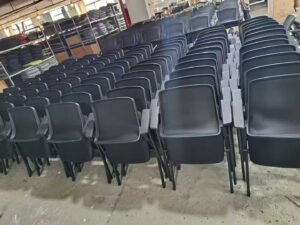
Sled-base chairs have a continuous curved base, allowing them to be stacked efficiently for storage. Common in training rooms and multipurpose venues.
Stackable or folding chairs are the most space-efficient option for venues that regularly reconfigure their layouts.
Guest chairs, placed in reception areas or in front of desks, share many characteristics with conference seating: clean design, moderate comfort for shorter visits, and aesthetic alignment with the surrounding environment.
10. Big & Tall Chairs
Best for: Users above 6’2″ or over 250 lbs; those who find standard chairs uncomfortable or improperly sized
Standard office chairs are typically engineered around an average body profile that does not accommodate every user. Big and tall chairs are specifically engineered for larger users, featuring:
- Reinforced frames (often steel or aluminum) rated to 400–500 lbs or more
- Wider seats (typically 22–24 inches or more)
- Higher backrests with extended lumbar and thoracic support zones
- Extended seat height ranges
- Stronger gas cylinders for durability under higher load
For users outside the standard size range, a properly sized big and tall chair is not a luxury — it is a functional necessity. Using an undersized chair leads to improper positioning, reduced circulation, and accelerated muscle fatigue.
11. 24-Hour / Heavy-Duty Chairs
Best for: Control rooms, dispatch centers, call centers, 24/7 operations, security monitoring
24-hour chairs are built to standards that exceed normal office use. While a standard office chair is typically rated for single-user, single-shift use (approximately 8 hours per day, 5 days per week), 24-hour chairs are engineered for continuous multi-shift use and multiple users.
Key specifications:
- BIFMA or equivalent certification for multi-shift use
- High-density foam that resists compression over extended periods
- Heavy-gauge steel or reinforced frames
- Extended warranty (typically 5+ years on all components)
- Extensive adjustability to accommodate multiple users of varying body types
Many 24-hour chairs also include wider weight capacity ratings and are often mandatory specifications for critical infrastructure environments where seating failure is operationally unacceptable.
12. Key Features to Look For in Any Office Chair
Regardless of which type of chair you select, the following features determine the degree to which the chair can be adapted to your body and your work:
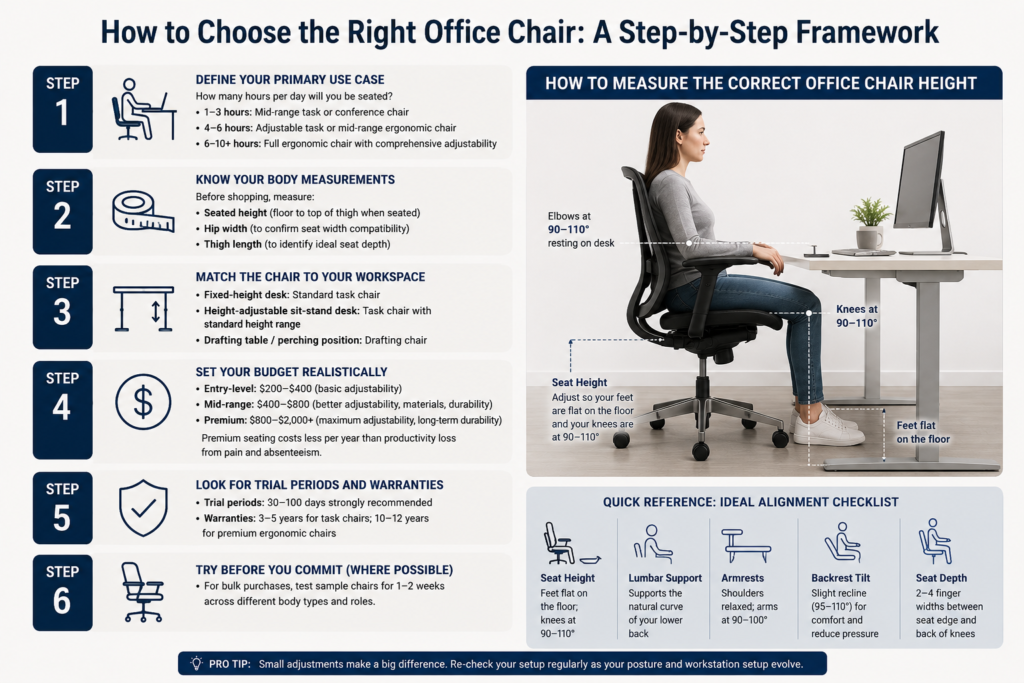
Seat height adjustment The most fundamental adjustment. Correct seat height allows your feet to rest flat on the floor (or on a footrest) with your knees at approximately a 90-degree angle and thighs parallel to the floor. Look for a gas lift range covering at least 16–21 inches.
Lumbar support Adjustable lumbar support — both height and depth — maintains the natural inward curve (lordosis) of the lower spine. Published research (De Carvalho et al., 2023, Ergonomics) confirms that adjustable lumbar support combined with seat pan tilt produces significantly more neutral spinal posture during extended sitting.
Seat depth adjustment The seat should support your thighs without pressing against the back of your knees. A seat depth adjustment of 1–3 inches accommodates different leg lengths effectively.
Armrests At minimum, height-adjustable armrests reduce load on the shoulders and neck. 4D armrests (adjustable in height, width, depth, and pivot angle) offer precise positioning that can meaningfully reduce upper extremity strain in intensive keyboard and mouse users.
Tilt mechanism and tension control A tilt mechanism allows the backrest (and sometimes the seat) to recline under a controlled resistance. Adjustable tension means the recline resistance can be tuned to your body weight, preventing either “slamming back” or requiring excessive effort to recline.
Headrest (optional) A headrest supports the cervical spine during recline and is especially valuable for users who take calls or participate in video meetings while seated. Not all tasks require a headrest, and some users find fixed headrests restrictive.
Seat material and cushioning High-resilience foam retains its support longer than low-resilience alternatives. Mesh seating provides breathability but may feel firmer than foam. Fabric offers comfort and breathability with easier cleaning than leather. Leather is durable and easy to wipe clean.
Base and casters A five-point base is the industry standard for stability. Caster wheels should be matched to your flooring: hard floor casters for carpet, soft rubber casters for hard floors and tile.
Weight capacity Always check that the chair’s rated weight capacity matches or exceeds your requirements.
Certifications Look for BIFMA (Business and Institutional Furniture Manufacturers Association) certification in North America, GREENGUARD Gold for low chemical emissions, or equivalent regional safety and sustainability certifications.
13. How to Choose the Right Office Chair: A Step-by-Step Framework
Step 1 — Define your primary use case
How many hours per day will you be seated? For 1–3 hours, a mid-range task or conference chair is adequate. For 4–6 hours, an adjustable task or mid-range ergonomic chair is recommended. For 6–10+ hours, prioritize a full ergonomic chair with comprehensive adjustability.
Step 2 — Know your body measurements
Before shopping, measure:
- Your seated height (from floor to the top of your thigh when seated, to find target seat height)
- The width of your hips (to confirm seat width compatibility)
- The length of your thighs (to identify ideal seat depth)
Step 3 — Match the chair to your workspace
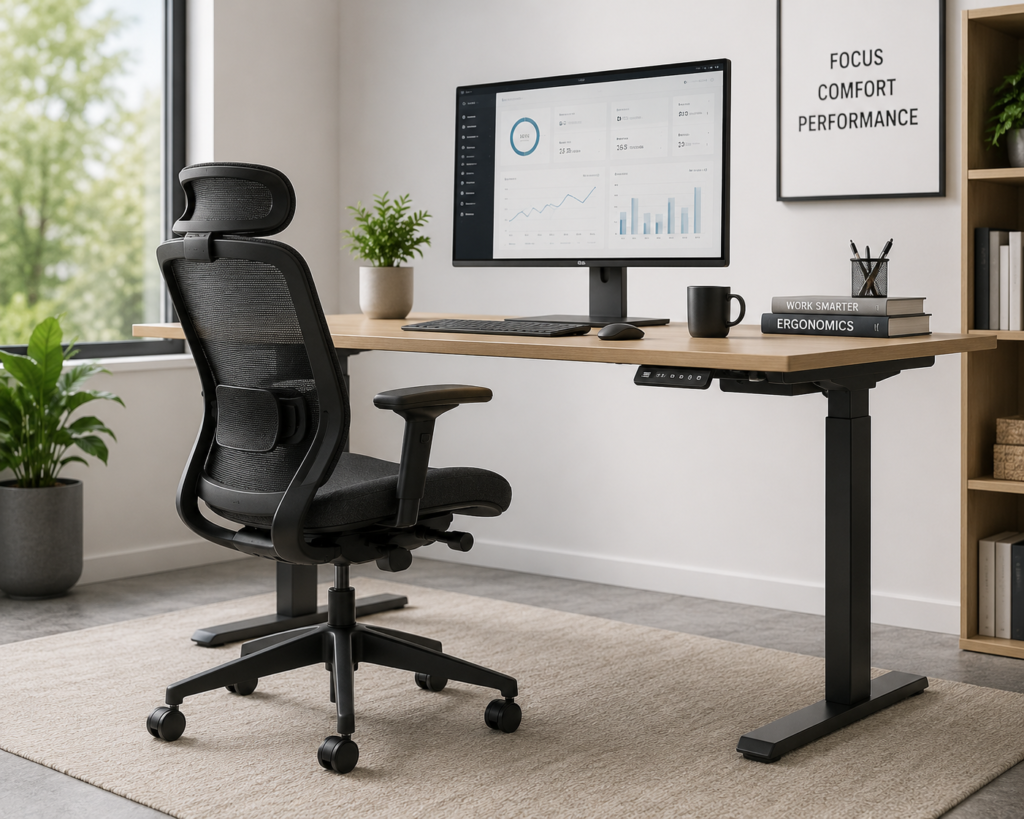
Will the chair be used at a fixed-height desk, a height-adjustable sit-stand desk, or a drafting table? Sit-stand desks pair best with task chairs in the standard height range, or with drafting chairs for users who adopt a perching position while at standing height.
Step 4 — Set your budget realistically
Entry-level ergonomic chairs start around $200–$400 and offer basic adjustability suitable for lighter use. Mid-range chairs ($400–$800) provide a significant step up in adjustability, materials, and durability — suitable for 6–8 hours of daily use. Premium ergonomic chairs ($800–$2,000+) offer the most comprehensive fit customization and the best documented long-term durability.
For business procurement decisions: the per-user annual cost of premium ergonomic seating is typically far lower than the estimated cost of productivity loss and absenteeism associated with work-related musculoskeletal disorders.
Step 5 — Look for trial periods and warranties
Given that fit and comfort can only be fully assessed after hours of use, purchasing from suppliers offering a trial period (30–100 days) is strongly advisable. Evaluate warranties: quality task chairs typically carry 3–5 year warranties; premium ergonomic chairs often carry 10–12 years on major components.
Step 6 — Try before you commit (where possible)
If purchasing in volume for a workplace, request sample units for a 1–2 week user trial across a representative range of body types and roles before committing to a full order.
14. Office Chair Comparison at a Glance
| Chair Type | Best Use Case | Typical Hours/Day | Price Range | Key Strength |
|---|---|---|---|---|
| Task Chair | General desk work | 4–8 hrs | $150–$600 | Value & versatility |
| Executive Chair | Private offices, leadership roles | 4–8 hrs | $300–$2,000+ | Aesthetics + upper back support |
| Ergonomic Chair | High-use, posture correction, back pain | 6–10+ hrs | $300–$2,000+ | Comprehensive adjustability |
| Mesh Chair | Warm environments, all-day use | 6–10 hrs | $200–$1,500 | Breathability + dynamic support |
| Leather Chair | Executive, formal spaces | 4–8 hrs | $300–$3,000+ | Durability + professional look |
| Kneeling Chair | Postural variation, focused tasks | 1–3 hrs (supplementary) | $100–$500 | Open hip angle, posture cue |
| Saddle Chair | Clinical, dental, lab, studio | 4–8 hrs | $200–$1,000 | Active sitting, standing transitions |
| Drafting Chair | Elevated desks, sit-stand workstations | 4–8 hrs | $150–$700 | Extended height range |
| Conference Chair | Meeting rooms, guest seating | 1–3 hrs | $100–$1,000 | Aesthetics + space efficiency |
| Big & Tall Chair | Larger users (250 lbs+, 6’2″+) | 4–8 hrs | $250–$1,500 | Reinforced construction, wider fit |
| 24-Hour Chair | Control rooms, multi-shift operations | Continuous | $500–$3,000+ | Heavy-duty durability, BIFMA rated |
15. Frequently Asked Questions

What is the healthiest type of office chair?
There is no single universally “healthiest” chair. However, the scientific evidence most consistently supports chairs with adjustable lumbar support and seat pan tilt as the combination most effective at producing neutral spinal postures. A well-adjusted ergonomic mesh or ergonomic task chair meets this standard for most users. The healthiest approach also involves regular postural breaks and movement throughout the day — no chair, however well-designed, eliminates the health impact of completely static sitting.
How much should I spend on an office chair?
For casual or part-time use (under 4 hours/day), $150–$350 buys a solid, adjustable task chair. For full-time desk workers (6+ hours/day), investing $400–$800 in a mid-range ergonomic chair provides a meaningful return in comfort and durability. For users with existing back conditions or those in intensive, long-hour roles, premium ergonomic chairs at $800–$1,500 offer the most comprehensive fit options.
What is the difference between a task chair and an ergonomic chair?
All ergonomic chairs are task chairs, but not all task chairs are ergonomic. A task chair refers to any standard office chair on casters designed for desk use. An ergonomic chair specifically refers to task chairs designed with adjustable features to accommodate a wide range of body types and promote neutral posture — typically including lumbar support adjustment, seat depth adjustment, 4D armrests, and tilt tension control.
Is mesh or foam better for an office chair?
Both have merit depending on your priorities. Mesh provides superior breathability and dynamic contouring — advantageous for warm environments and all-day use. High-quality foam provides a softer initial feel and better insulation in cold environments. Many modern ergonomic chairs use a hybrid approach: a mesh backrest for breathability and a contoured foam seat for cushioning pressure distribution.
How long should an office chair last?
A quality task chair should last 5–10 years with regular use. Premium ergonomic chairs from established brands are often warranted for 10–12 years on structural components. Key factors affecting longevity include daily hours of use, the quality of the gas lift and caster wheels, and the durability of the seat foam or mesh.
Can an office chair cause or relieve back pain?
Chair design can contribute to both. Research published in Ergonomics (De Carvalho et al., 2023) found that 39% of study participants developed measurable pain during a standard sitting task in an unsupported chair, while chairs with proper lumbar support and seat tilt produced significantly more neutral posture. An ergonomic chair alone is not a cure for chronic back pain — medical evaluation is essential for persistent pain — but a properly adjusted ergonomic chair is one evidence-supported component of a healthy seated work environment.
What certifications should I look for in an office chair?
Look for BIFMA certification (the standard testing protocol for commercial office furniture in North America), GREENGUARD Gold (low chemical emissions — particularly important for enclosed office environments), and, for European buyers, EN 1335 (the EU standard for office chairs covering dimensions, strength, durability, and safety).
Final Thoughts
An office chair is one of the highest-contact pieces of equipment in any workplace — most users interact with it more closely, for longer periods, than any other item of office furniture. The right choice depends on your hours of use, your body dimensions, your workspace layout, and your budget — but the starting point is always understanding what each chair type is genuinely designed to do.
If you’re unsure where to begin, an adjustable ergonomic task chair in the $400–$800 range, with a mesh back, adjustable lumbar support, seat depth adjustment, and 4D armrests, covers the needs of the widest range of users in the widest range of environments.
References and Further Reading
- De Carvalho, D.E. et al. (2023). Effect of office chair design features on lumbar spine posture, muscle activity and perceived pain during prolonged sitting. Ergonomics, 66(10), 1465–1476. doi:10.1080/00140139.2022.2152113
- Fitrianto, T.R. et al. (2025). Evaluation of office chairs to enhance comfort and reduce musculoskeletal risk in sedentary work environments. Journal of SENOPATI: Sustainable Ergonomics Optimization Applications in Industrial Engineering, 6, 114–121.
- Musculoskeletal disorders among office workers: prevalence, ergonomic risk factors, and their interrelationships. Scientific Reports (2025). Nature
- International Association for the Study of Pain (IASP). (2025). Back Pain in the Workplace Fact Sheet.
- Fortune Business Insights. (2025). Office Chairs Market Size, Share & Trends Report.
- Business and Institutional Furniture Manufacturers Association (BIFMA). Performance Standards for Office Chairs (BIFMA X5.1).
- Alaca, N., Acar, A.Ö., & Öztürk, S. (2025). Low back pain and sitting time, posture and behavior in office workers: A scoping review. Journal of Back and Musculoskeletal Rehabilitation.
This article was written and reviewed by our office furniture specialists. All market data is sourced from independently published industry reports. Medical information is sourced from peer-reviewed literature and does not constitute medical advice. Consult a qualified healthcare professional for persistent musculoskeletal symptoms.
© [szsyckj] | Last updated: 2025